Elyza Myanmar Chatbot
A rule-based Myanmar language chatbot with emotion detection, served as a Flask REST API.
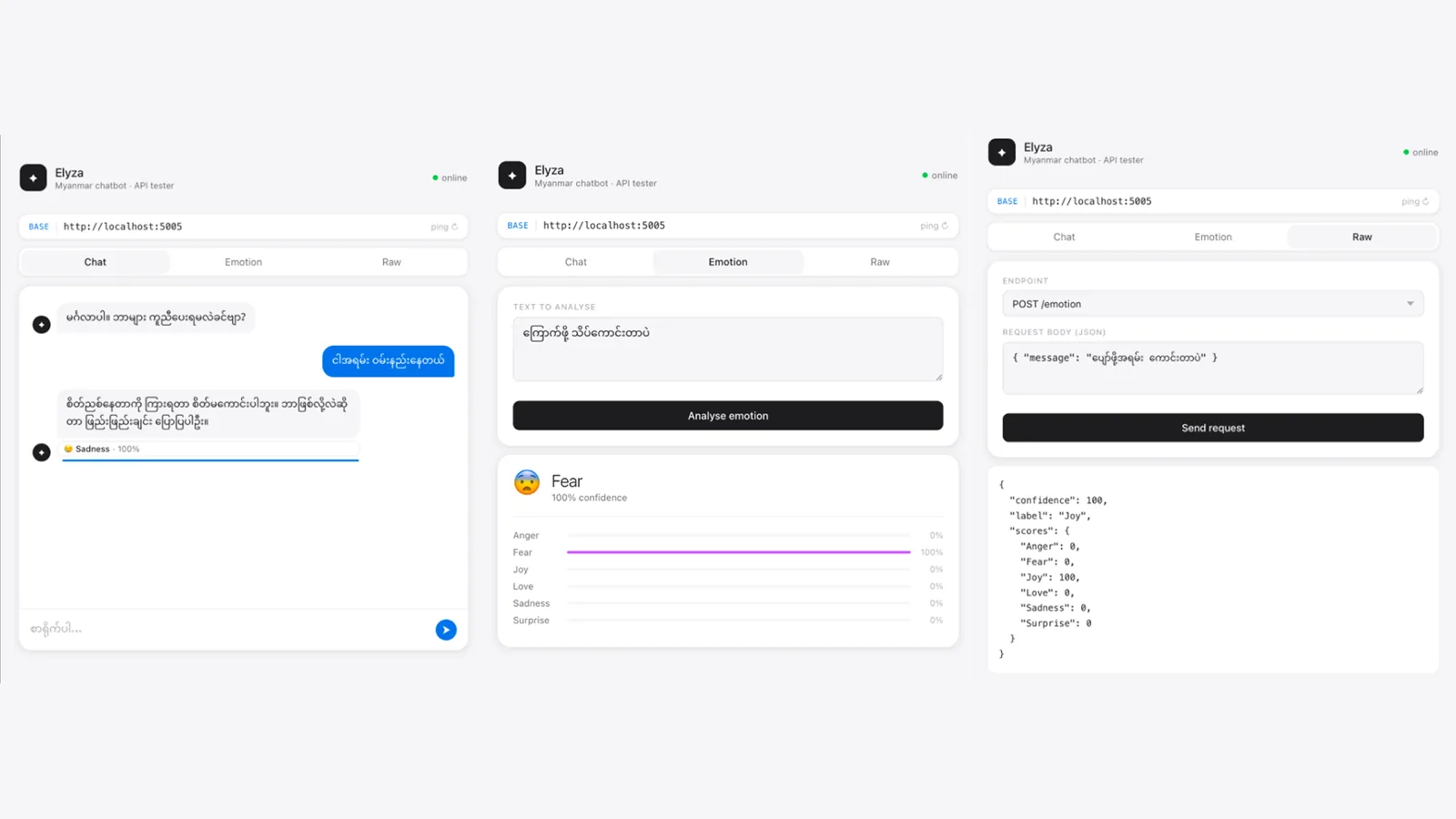
Key Highlights
- ◆Emotion classification across 6 categories (Joy, Sadness, Love, Anger, Fear, Surprise)
- ◆Rule-based Burmese NLP response engine
- ◆Flask REST API with CORS support
- ◆Minimal HTML UI for browser testing
Overview
Elyza is a Burmese-language chatbot inspired by the world's first chatbot, ELIZA - reimagined for Myanmar language. It detects emotional context in user messages and returns empathetic, context-aware replies. Served as a Flask REST API with a lightweight HTML UI for testing. Designed for educational purposes, research, and NLP experimentation in Burmese.
Features
- –Rule-based Myanmar language response engine
- –Emotion detection across 6 emotions with confidence scores
- –Flask REST API with CORS enabled
- –Minimal HTML UI - open directly in any browser
- –Quit keyword detection (ဘိုင်, bye, exit, etc.)
API Endpoints
| Method | Path | Description |
|---|---|---|
| GET | / | Health check - returns a random greeting |
| GET | /greet | Returns a random opening greeting |
| POST | /chat | Send a message, receive reply + emotion analysis |
| POST | /emotion | Emotion analysis only, no bot reply |
Installation & Setup
1. Clone the repository
git clone https://github.com/sai-zack-dev/myanmar-chatbot.git
cd myanmar-chatbot
2. Create & activate a virtual environment
# macOS / Linux
python3 -m venv venv && source venv/bin/activate

# Windows
python -m venv venv && venv\Scripts\activate
3. Install dependencies
pip install -r requirements.txt
# flask>=3.0.0, flask-cors>=4.0.0
4. Run the Flask server
python app.py
# API live at http://localhost:5005
5. Open the UI
ℹ Open index.html directly in your browser. Set BASE URL to http://localhost:5005 and click ping ↻ to confirm connection.
Usage
Example API call - chat endpoint:
# Request
curl -X POST http://localhost:5005/chat \
  -H "Content-Type: application/json" \
  -d '{"message": "မင်္ဂလာပါ"}'

# Response
{
  "user_message": "မင်္ဂလာပါ",
  "bot_reply": "ဟုတ်ကဲ့၊ ဆက်ပြောပါဦး။",
  "is_quit": false,
  "emotion": {
    "label": "Joy",
    "confidence": 66.7,
    "scores": { "Sadness": 8.3, "Joy": 66.7, "Love": 8.3, ... }
  }
}
Related Projects
Burmese Handwriting Dataset Collector
A data collection tool for gathering high-quality handwritten Burmese character samples for ML training.
View project →Myanmar Handwriting Recognition
AI-powered deep learning system for recognizing and classifying handwritten Burmese characters.
View project →QBIV
Query-Based Intelligence Visualization
A cross-platform desktop BI tool that empowers non-technical users to query and visualize data from databases using AI-powered natural language.
View project →